Engagement Announcement Photo Collage
Half your feed has already posted the same close-up of a hand, so keep the ring photo — then set it inside the years that built up to the yes, which is the part nobody else has.
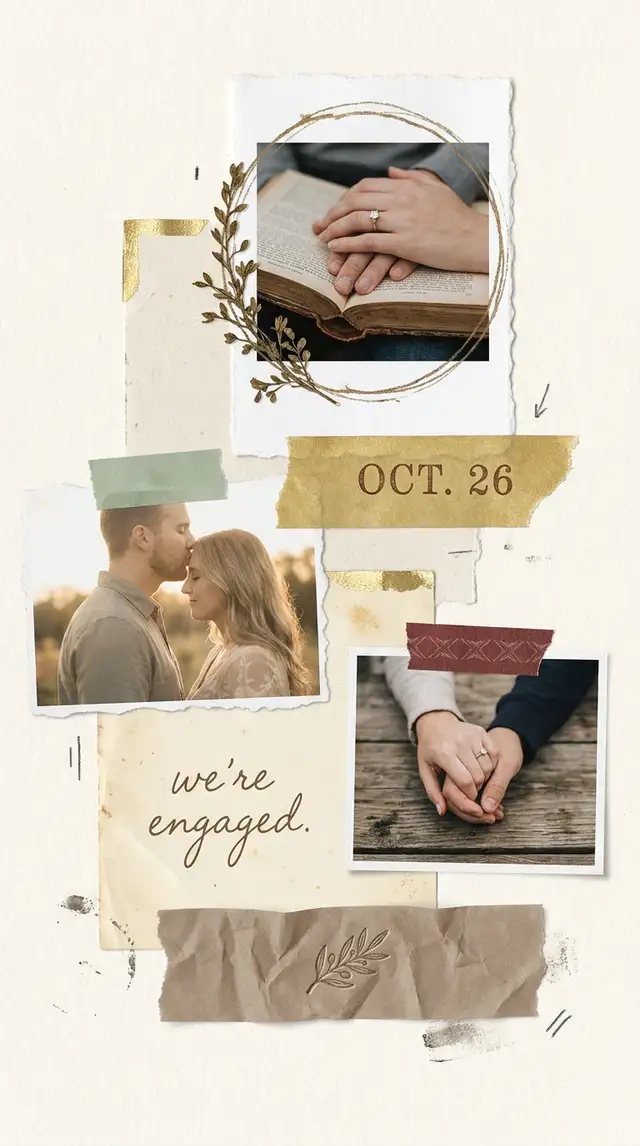
Choose a ratio
Ingredients
- 5-8 photos that span the relationship — the proposal, an early-days photo, two or three from the years in between, and one detail shot (the ring on a book, hands clasped, the venue of the proposal)
- The ring or proposal photo as your hero — saved at the highest resolution you have
- A cream, parchment, or muted blush Background — nothing too sweet
- A few soft Poetcore textures from the Sticker Library — botanical sprigs, deckled paper edges, antique gold accents
- An elegant serif font for the date or a single short line of text
- Optional: a screenshot of the text you sent your best friend right after, a photo of the location written in your own handwriting, a pressed flower from the venue
How to make it
Make this in your browser Opens this recipe as a ready template — photo slots, decorations and the right canvas shape. No install, no account, and your photos never leave your device.-
Choose Freestyle or a soft asymmetric Grid
Tap Freestyle for a curated, slightly imperfect arrangement, or pick a Grid with uneven cells and rounded corners. Avoid anything symmetrical or template-feeling — engagement collages should look hand-arranged, like something a friend made for the announcement. Set the canvas to portrait — it reads on a phone screen, a printed save-the-date, and a frame.
-
Anchor the layout with the hero photo
Place the ring photo (or proposal photo) larger than the rest, slightly off-center. Everything else orbits it. Around the hero, scatter the relationship-history photos — the early dinner together, the road trip, the apartment couch. Resize freely. The point is to surround the proposal with the years that earned it.
-
Run a unified soft-romantic edit
Tap each photo and open Photo Editing. Lift highlights, push warmth up just slightly, drop saturation a notch. Aim for warm whites, gentle contrast, and a faded sun-through-curtain quality. Every photo should feel like it belongs in the same letter. Avoid heavy filters, blue tones, or anything that screams Instagram preset.
-
Set a quiet, grounded background
In Backgrounds, cream, parchment and muted blush all work. What doesn't: candy pinks, and any white so bright it competes with the photos. Aim for the endpaper of a hardback book — warm, neutral, calm. A subtle paper texture from the Sticker Library, set to low opacity, takes care of a solid that reads flat.
-
Add restrained Poetcore touches
Open the Sticker Library and search for botanical sprigs, deckled paper edges, antique gold accents. Tuck one botanical near the hero photo, place a deckled edge under another. Two or three accents total — the photos do the talking, the decoration just sets the register. Skip glitter, hearts in primary colors, and anything labeled "wedding."
-
Write one short line — that's the whole copy
Tap Custom Text and type something quiet. The date ("June 14, 2026"), a single word ("yes"), the year set small in serif type, or a phrase with weight ("She said yes" / "After eight years"). Use an elegant serif and keep it small. Restraint is the entire brief — this isn't the wedding invitation yet.
-
Save in portrait at full resolution
Saved once, the same composition reads on a digital announcement, a printed save-the-date, and the framed copy for the parents. Export at the highest quality. For digital, share to family first before posting publicly. For print, order at 5x7 on matte and slip into a small frame.
Try it differently
The Save-the-Date Crossover
Designed to double as a printable save-the-date — leaves clean negative space at the bottom for venue and date typography. Pick a Grid or Freestyle layout that pulls all photos to the upper two-thirds of the canvas. Keep the lower third empty cream so a calligrapher (or a wedding stationer) can drop type cleanly into the space later.
The Quiet Announcement
Three photos and one line of text. For couples who want to share the news without a full production. Use a 1x3 vertical Grid, the ring photo on top, a candid in the middle, a hands-clasped detail at the bottom. One line of serif text below: the date or a single phrase. The whole thing reads in two seconds and feels expensive.
The Multi-Era Edition
Each panel is one era of the relationship — the early year, the moving-in-together year, the engagement. Useful when 5-8 photos can't sit on one canvas without crowding, and the story wants chapters. Use a 2x3 or 3x2 Grid. Add a small year label under each panel in tiny serif type.
Tips from the desk
- The ring photo doesn't need to be perfect — slightly out of focus often reads more genuine than a studio close-up
- Warm cream and antique gold (#A8896C) flatter every skin tone and every era of relationship photo
- Match the warmth of all photos before placing them — uneven warmth is what makes a collage look amateur
- A single botanical sprig says "soft and intentional"; a wreath of botanicals says "Etsy template"
- Save as PNG for print at 5x7 or 8x10 on matte paper — gloss reads as graduation portrait, matte reads as keepsake
Frequently asked
-
What is a Engagement Announcement Photo Collage?
Half your feed has already posted the same close-up of a hand, so keep the ring photo — then set it inside the years that built up to the yes, which is the part nobody else has.
-
What do I need to make a Engagement Announcement Photo Collage?
You will need: 5-8 photos that span the relationship — the proposal, an early-days photo, two or three from the years in between, and one detail shot (the ring on a book, hands clasped, the venue of the proposal), The ring or proposal photo as your hero — saved at the highest resolution you have, A cream, parchment, or muted blush Background — nothing too sweet, A few soft Poetcore textures from the Sticker Library — botanical sprigs, deckled paper edges, antique gold accents, An elegant serif font for the date or a single short line of text, Optional: a screenshot of the text you sent your best friend right after, a photo of the location written in your own handwriting, a pressed flower from the venue.
-
How many photos do I need for a Engagement Announcement Photo Collage?
Around 5-8 photos works best — enough to tell the story without crowding the layout.
-
What size or ratio is best for a Engagement Announcement Photo Collage?
A 9:16 vertical format works best — ideal for phone wallpapers and Instagram or TikTok Stories.
-
How long does it take to make a Engagement Announcement Photo Collage?
This collage takes about 20 min to make.
Free photo tools — no upload, no account
38 small tools that run in your browser. Your photos never leave your device.

Color Replace
Eyedropper a color in your photo, swap it for another.

Pencil Sketch
Photo to graphite drawing in two clicks.

Photo Mosaic
Photo as tiles with grout-color gaps.

Vintage Postcard
Greetings caption, faux stamp, postmark, paper texture.

Photo Watermark
Corner sign-off or full diagonal tile.

Image Compressor
Smaller JPG, WebP, or PNG — same look, less file.
Learn the craft
- What Is a Collage? A Beginner's Guide to Every Style Photo collage, paper collage, digital, mixed media — a clear breakdown of every collage type, a short history, and a glossary to get you started.
- How to Make a Photo Collage in 8 Steps (2026) How to make a photo collage in 8 easy steps — from choosing your photos and layout to decorating and saving. A beginner's guide that works in any collage app.
- How to Choose a Collage Style Five distinct collage styles — from scrapbook warmth to minimalist calm. Find the one that fits your photos and your purpose.
- Best Photo Collage Apps in 2026: 7 Tested Free & Paid Picks We tested the best photo collage apps for iPhone & Android — PicCollage for creative freedom, Google Photos for quick free grids, Canva for polish. Compared inside.
You might also like
A few more cuts & pastes from the archive.

Baby's First Year Photo Collage
The hospital photo and the cake-smash photo are twelve months apart and look like two different children. Put them at opposite corners of o…

