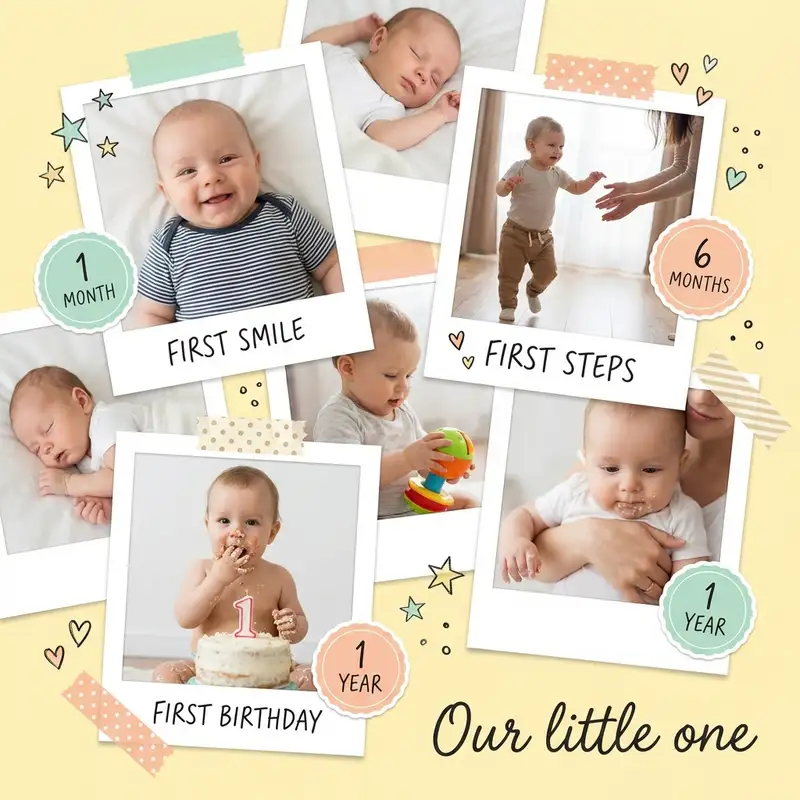
Baby's First Year Photo Collage
The hospital photo and the cake-smash photo are twelve months apart and look like two different children. Put them at opposite corners of one page and the year finally stops moving.
Choose a ratio
Ingredients
- 4-8 milestone photos from your camera roll (newborn, first smile, sitting up, first steps, birthday — pick the moments that mark the biggest leaps)
- 1 newborn hospital photo or first-day-home portrait
- 1 first birthday or cake smash photo
- Baby-themed stickers from the Sticker Library (milestone badges, tiny hearts, stars, animals)
- A soft pastel background — warm cream, blush, or pale butter yellow
- A gentle hand-lettered or clean sans-serif font for month labels
- Optional: detail shots of a hospital bracelet, tiny shoes, or the coming-home outfit
How to make it
Make this in your browser Opens this recipe as a ready template — photo slots, decorations and the right canvas shape. No install, no account, and your photos never leave your device.-
Start with a grid that fits your photos
Open Grids and pick a 2x2 or 2x3 layout depending on how many photos you have. A square canvas does the work here: a block of months reads evenly, with no odd row left hanging, and it fits a nursery frame without cropping anyone out. Bump up the border width to give each photo breathing room, and round the corners generously. Soft, rounded frames echo the roundness of baby cheeks.
-
Fill each cell with a milestone
Import your photos and drop them into the grid in order — newborn first, birthday last. Tap each one to crop and reposition, zoom in on faces, center the smile. If a cell feels weaker, crop tighter; a close-up of a laughing face forgives almost any lighting problem.
-
Set a warm pastel background
Swipe to Backgrounds and choose a soft solid color — pale peach, butter cream, or dusty mint. Browse the Sticker Library for a subtle canvas texture if you want a little warmth beneath the grid. Avoid stark white; pastels feel more like a nursery wall.
-
Label each month
Tap Custom Text and add small month markers beneath or inside each cell: "one," "two," "three" or "1 month," "2 months." Pick a hand-lettered font in warm gray or muted blush. Keep the size small and the placement consistent — the labels should support, not compete.
-
Decorate with baby stickers and a title
Open the Sticker Library and search for baby milestones, tiny stars, or soft animal illustrations. Tuck them into corners of the grid, not over faces. Add the baby's name across the top using Custom Text in something warm and hand-touched, with the birthdate in smaller type below.
-
Warm everything and save
Tap each photo and use Photo Editing to nudge warmth up slightly and push toward peach and golden tones. This unifies twelve months of different cameras and lighting into one tonal family. Save at full resolution — for printing, export at the highest quality.
Try it differently
Timeline Poster Version
Skip the grid. Open Freestyle and run your milestone photos in a single horizontal line with generous spacing. Add the newborn photo large on the left and the birthday photo large on the right as bookends. Save at a wide aspect ratio for a nursery wall print.
Instagram Carousel
Break the year into four slides of three months each, plus an opening slide with the name and birth stats. Use the same background and label style across all slides so swiping feels like turning pages. Share on the first birthday.
Animated Keepsake
Use Animation to make each monthly photo appear one by one, building from newborn to birthday. Export as a looping video and send it to grandparents — this is the version that makes people cry.
Tips from the desk
- Consistency in monthly photos is everything — same blanket or same stuffed animal for scale makes the growth unmistakable
- Use Photo Editing to warm the white balance on all photos before placing them; mixed lighting from different months is the fastest way to make a collage feel scattered
- Export as PNG for printing and as high-quality JPEG for sharing via WhatsApp or message
- If printing, save at the largest resolution available — baby collages tend to get framed and kept forever
Frequently asked
-
What is a Baby's First Year Photo Collage?
The hospital photo and the cake-smash photo are twelve months apart and look like two different children. Put them at opposite corners of one page and the year finally stops moving.
-
What do I need to make a Baby's First Year Photo Collage?
You will need: 4-8 milestone photos from your camera roll (newborn, first smile, sitting up, first steps, birthday — pick the moments that mark the biggest leaps), 1 newborn hospital photo or first-day-home portrait, 1 first birthday or cake smash photo, Baby-themed stickers from the Sticker Library (milestone badges, tiny hearts, stars, animals), A soft pastel background — warm cream, blush, or pale butter yellow, A gentle hand-lettered or clean sans-serif font for month labels, Optional: detail shots of a hospital bracelet, tiny shoes, or the coming-home outfit.
-
How many photos do I need for a Baby's First Year Photo Collage?
Around 4-8 photos works best — enough to tell the story without crowding the layout.
-
What size or ratio is best for a Baby's First Year Photo Collage?
A 1:1 square format works best — perfect for Instagram posts and easy to print.
-
How long does it take to make a Baby's First Year Photo Collage?
This collage takes about 30 min to make.
Free photo tools — no upload, no account
38 small tools that run in your browser. Your photos never leave your device.

Shape Crop
Circle, heart, star, arch — pick a cookie cutter.

Vintage Date Stamp
LED red, Kodak yellow, camcorder amber.

EXIF Stripper
Remove GPS, camera info, timestamps before posting.

Text Behind Subject
Drop a word behind your subject, magazine-cover style.

Light Leak
Sunset, lomo red, golden hour — bleed light into corners.

Photo Strip Maker
Four photos, B&W mode, handwritten caption.
Learn the craft
- What Is a Collage? A Beginner's Guide to Every Style Photo collage, paper collage, digital, mixed media — a clear breakdown of every collage type, a short history, and a glossary to get you started.
- How to Make a Photo Collage in 8 Steps (2026) How to make a photo collage in 8 easy steps — from choosing your photos and layout to decorating and saving. A beginner's guide that works in any collage app.
- How to Choose a Collage Style Five distinct collage styles — from scrapbook warmth to minimalist calm. Find the one that fits your photos and your purpose.
- Best Photo Collage Apps in 2026: 7 Tested Free & Paid Picks We tested the best photo collage apps for iPhone & Android — PicCollage for creative freedom, Google Photos for quick free grids, Canva for polish. Compared inside.
You might also like
A few more cuts & pastes from the archive.

Vintage Wedding Collage
Somewhere there is a wedding album with a cracked spine, gold script on the cover, and photographs gone the color of weak tea. This recipe…

