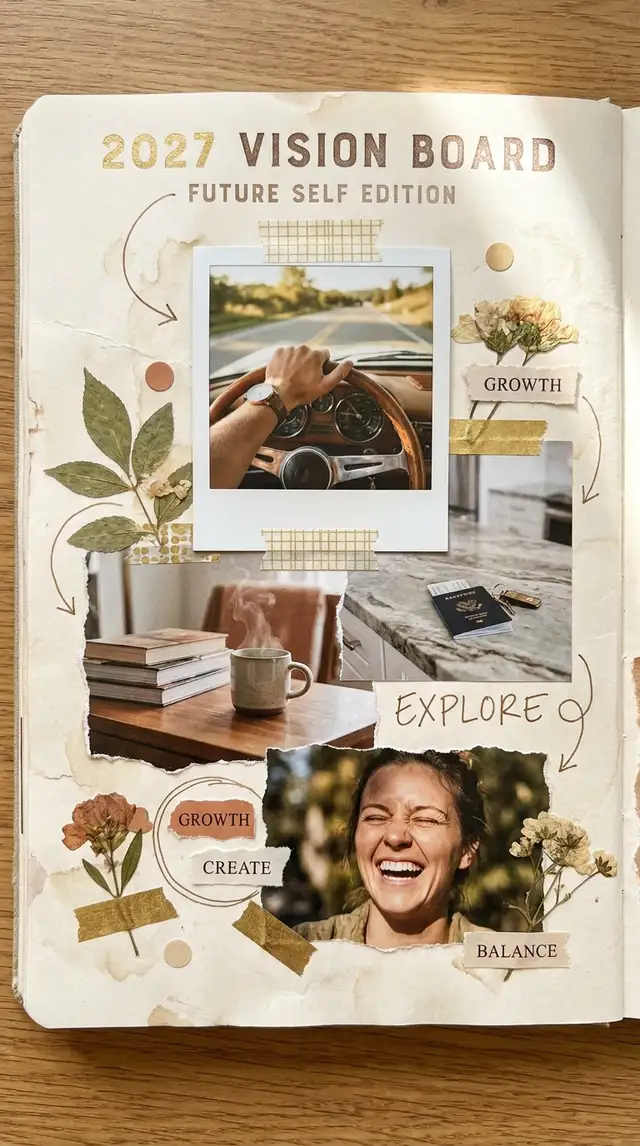
Vision Board Collage for the Year Ahead (Future Self Edition)
Vision boards are easy to make in January and easy to ignore by February. This one holds up because every image on it comes from the life you're actually stepping into, not the apartment Pinterest told you to want.
Choose a ratio
Ingredients
- 8-12 images sorted by life area — career, relationships, health, home, money, identity (1-3 per area)
- A mix of sources: a few of your own photos, a few from magazines or saved Pins, a few stock images for the things you don't have yet
- A calm, warm Background — cream, soft sage, dusty pink, or a warm linen texture
- Magazine-cutout textures and Polaroid-style frames from the Sticker Library
- A clean serif or handwritten font for short, present-tense intentions
- Optional: a photo of an object you already own that represents what you want (a key, a notebook, a passport), one screenshot of a saved Pin you keep coming back to
How to make it
Make this in your browser Opens this recipe as a ready template — photo slots, decorations and the right canvas shape. No install, no account, and your photos never leave your device.-
Open Freestyle for an unstructured canvas
Tap Freestyle. Vision boards need to feel emergent, not boxed in — a Grid will fight you. This should look like a journal page someone built over a slow afternoon. Set the canvas to portrait so it doubles as a phone wallpaper.
-
Sort photos by life area before you import
In your camera roll or Pin saves, mentally cluster them: career, relationships, health, home, money, identity. Pull 1-3 for each area. The constraint is what makes the board feel coherent — without it, you end up with twenty pretty things and no shape. If an area feels empty, that's information; either skip it or sit with why.
-
Use Magic Cutout to claim specific objects
Tap Magic Cutout on photos of things you want — a ring, a passport, a laptop, a key, a specific car. Lifting them free of their original background makes them feel claimed, not just pictured. A floating passport on a cream background reads "this is mine in 2027." A passport in a stock photo reads "this is someone else's life."
-
Choose a calm Background
Swipe to Backgrounds and pick warm cream, soft sage, dusty pink, or a warm linen texture. Skip patterns — the photos already do the work. The background's only job is to hold them gently, not compete.
-
Arrange in life-area clusters, not a grid
Place the photos in loose groupings — career in one corner, home in another. Let them overlap slightly. Use Polaroid-style frames or magazine-cutout edges from the Sticker Library on a few — not all — to add visual rhythm. The board should feel built, not laid out.
-
Add one short intention per cluster
Tap Custom Text and type one short, present-tense, first-person line per life area. "I live in a place with morning light." "I write every day before the inbox opens." Skip "I want to," skip "I will" — present tense only. Keep the type small, in serif or a clean handwritten font. Two or three lines maximum across the whole board.
-
Save twice — wallpaper and print
Save at full resolution for phone wallpaper (set as your lock screen), then export a printable version too. The lock-screen version is what makes this work — you'll see it eight times before lunch. Print the full-res version at 8x10 for the wall above your desk.
Try it differently
The Phone Wallpaper Version
Designed in 9:16 with a clean center column — set as your lock screen so you see it every time you check the time. Pull the most-loaded life-area cluster to the top third (where the clock sits), keep the middle for one short intention, and let the bottom third carry the rest. The board does its job in the half-second between picking up your phone and unlocking it.
The Letter to Future-You
A long Custom Text passage written second-person to the version of you who'll see this next December — turns the board from a wishlist into a sealed message worth opening. Reduce photos to 4-6, give half the canvas to the letter in a clean serif font. Save it, set a calendar reminder for December 2027, and don't look at it until then.
The Identity Board
Skips life-areas entirely — just images of the version of yourself you're becoming. Heavier on portraits, fewer objects, a single-line affirmation. Use Magic Cutout on the people whose presence in your life you're calling in (or just on yourself, lifted from a photo where you already look like the version you're becoming).
Tips from the desk
- Specificity is the whole point — "a sunlit kitchen with a marble counter" beats "a beautiful home"
- Present tense only — your nervous system reads "I want" and "I have" very differently
- Warm gold (#C9A96E), cream, sage, and terracotta age better than neon or pastels — you'll still look at this in February
- Magic Cutout on objects you want to own makes them feel claimed; stock photos of those same objects feel borrowed
- Keep the photo count under 12 — past that, the eye stops landing on any one of them
Frequently asked
-
What is a Vision Board Collage for the Year Ahead (Future Self Edition)?
Vision boards are easy to make in January and easy to ignore by February. This one holds up because every image on it comes from the life you're actually stepping into, not the apartment Pinterest told you to want.
-
What do I need to make a Vision Board Collage for the Year Ahead (Future Self Edition)?
You will need: 8-12 images sorted by life area — career, relationships, health, home, money, identity (1-3 per area), A mix of sources: a few of your own photos, a few from magazines or saved Pins, a few stock images for the things you don't have yet, A calm, warm Background — cream, soft sage, dusty pink, or a warm linen texture, Magazine-cutout textures and Polaroid-style frames from the Sticker Library, A clean serif or handwritten font for short, present-tense intentions, Optional: a photo of an object you already own that represents what you want (a key, a notebook, a passport), one screenshot of a saved Pin you keep coming back to.
-
How many photos do I need for a Vision Board Collage for the Year Ahead (Future Self Edition)?
Around 8-12 photos works best — enough to tell the story without crowding the layout.
-
What size or ratio is best for a Vision Board Collage for the Year Ahead (Future Self Edition)?
A 9:16 vertical format works best — ideal for phone wallpapers and Instagram or TikTok Stories.
-
How long does it take to make a Vision Board Collage for the Year Ahead (Future Self Edition)?
This collage takes about 25 min to make.
Free photo tools — no upload, no account
38 small tools that run in your browser. Your photos never leave your device.

Vintage Date Stamp
LED red, Kodak yellow, camcorder amber.

EXIF Stripper
Remove GPS, camera info, timestamps before posting.

Text Behind Subject
Drop a word behind your subject, magazine-cover style.

Light Leak
Sunset, lomo red, golden hour — bleed light into corners.

Photo Strip Maker
Four photos, B&W mode, handwritten caption.

Social Banner
X, LinkedIn, or YouTube cover with title overlay.
Learn the craft
- What Is a Collage? A Beginner's Guide to Every Style Photo collage, paper collage, digital, mixed media — a clear breakdown of every collage type, a short history, and a glossary to get you started.
- How to Make a Photo Collage in 8 Steps (2026) How to make a photo collage in 8 easy steps — from choosing your photos and layout to decorating and saving. A beginner's guide that works in any collage app.
- How to Choose a Collage Style Five distinct collage styles — from scrapbook warmth to minimalist calm. Find the one that fits your photos and your purpose.
- Best Photo Collage Apps in 2026: 7 Tested Free & Paid Picks We tested the best photo collage apps for iPhone & Android — PicCollage for creative freedom, Google Photos for quick free grids, Canva for polish. Compared inside.
You might also like
A few more cuts & pastes from the archive.

Holiday Greeting Card Collage
By mid-December the fridge door is a grid of other families in matching sweaters, all shot against the same white studio wall. The card tha…

