Holiday Greeting Card Collage
By mid-December the fridge door is a grid of other families in matching sweaters, all shot against the same white studio wall. The card that stays up until March is the one where something actually happened this year.
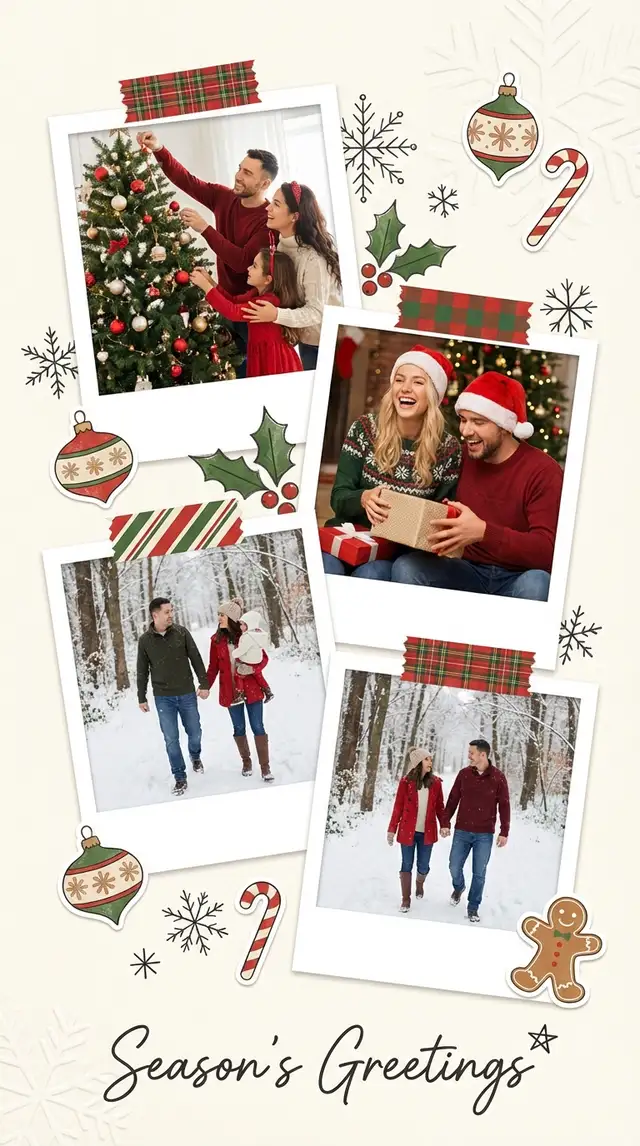
Choose a ratio
Ingredients
- 3-5 photos from the past year (family milestones, vacations, everyday joy, one good group shot)
- A background in deep cranberry, forest green, or midnight navy
- Festive stickers from the Sticker Library — snowflakes, holly, ornaments, pine branches, gold stars
- A festive but readable font for the greeting and a clean serif or sans-serif for names
- Gold, cream, or white accent palette
- Optional: a photo of a handwritten family signature to place with Magic Cutout
How to make it
Make this in your browser Opens this recipe as a ready template — photo slots, decorations and the right canvas shape. No install, no account, and your photos never leave your device.-
Leave space for the greeting
Start in Freestyle with a portrait canvas and make one photo frame larger than the others. Keep a band of space for the message. Portrait here is 9:16, useful for a phone story; if you are printing, set the canvas to your print service's required dimensions before arranging the photos. A tall canvas alone does not guarantee a card or envelope fit.
-
Place your hero photo
Tap the largest placeholder and import the single best family photo from the year. This is the photo people will look at first and remember longest. It should be genuinely happy — not the most "perfect" shot, but the most alive one. Crop to center the faces.
-
Fill in the year's story
Drop two to four more photos into the remaining slots. These tell the story of the year: the trip, the new house, the dog, the birthday cake. Use Photo Editing to warm up any photos that feel too cool — holiday cards live in golden, amber light.
-
Adjust the background and borders
Choose deep cranberry or evergreen in Backgrounds, then give the photos a narrow cream border. For a lighter card, keep the background cream and let the ornaments carry the festive color. Leave enough contrast for a short greeting to be read at phone size.
-
Decorate with festive restraint
Open the Sticker Library and search for holly, gold stars, snowflakes, or pine branches. Place one or two in the corners. Add your greeting with Custom Text: "Happy Holidays from the [Family Name]" in a font that feels handwritten but stays legible. Use the Doodle Tool to add a small star or underline. Restraint matters — one or two festive touches say "holiday" without saying "craft store explosion."
-
Save for print and digital
Save a high-quality still image for the family chat. For printed cards, use the highest-resolution export and check the printer's crop preview, safe area and requested dimensions. Keep faces and the greeting away from the trim. Make a separate square or 9:16 version if you need it, and check the layout after changing the shape.
Try it differently
Vintage Holiday Edition
Skip the template. Open Freestyle and set the background to a kraft paper or aged cream from the Sticker Library. Desaturate your photos with Photo Editing and push them toward warm amber. Use a classic serif font for the greeting. Feels like a card from your grandparents' era.
Modern Minimal Version
Open a Grid with 2x3 cells. White background, no stickers, generous border spacing. Drop in your best photos and add a single line of clean sans-serif text. Let the photos carry all the warmth.
Year-in-Review Carousel
Build four separate collages — one per season, each with two photos and a short caption. The final slide is the greeting. Share as an Instagram carousel the week before Christmas.
Tips from the desk
- Cranberry and gold (#9B3B3B with warm metallic accents) is the holiday combination that never tires
- One candid laughing photo is worth five posed smiles — people connect with joy, not perfection
- If printing, order or print a small proof first; a phone screen cannot show exactly how the paper will reproduce the colors
- Use the same template and background color for all your cards — swap only the greeting text for different recipients
Frequently asked
-
What is a Holiday Greeting Card Collage?
By mid-December the fridge door is a grid of other families in matching sweaters, all shot against the same white studio wall. The card that stays up until March is the one where something actually happened this year.
-
What do I need to make a Holiday Greeting Card Collage?
You will need: 3-5 photos from the past year (family milestones, vacations, everyday joy, one good group shot), A background in deep cranberry, forest green, or midnight navy, Festive stickers from the Sticker Library — snowflakes, holly, ornaments, pine branches, gold stars, A festive but readable font for the greeting and a clean serif or sans-serif for names, Gold, cream, or white accent palette, Optional: a photo of a handwritten family signature to place with Magic Cutout.
-
How many photos do I need for a Holiday Greeting Card Collage?
Around 3-5 photos works best — enough to tell the story without crowding the layout.
-
What size or ratio is best for a Holiday Greeting Card Collage?
A 9:16 vertical format works best — ideal for phone wallpapers and Instagram or TikTok Stories.
-
How long does it take to make a Holiday Greeting Card Collage?
This collage takes about 20 min to make.
Free photo tools — no upload, no account
38 small tools that run in your browser. Your photos never leave your device.

Washi Tape Overlay
Stick paper-mood tape onto any photo.

Blur & Pixelate
Hide faces, plates, addresses — drag a patch over the spot.

Background Replace
Drop your subject onto paper, gradient, or your own backdrop photo.

Tilt-Shift Effect
Make real cities look like tabletop dioramas.

Polaroid Maker
Any photo, wrapped in paper with a handwritten caption.

Pinterest Pin Maker
Drop a photo, type a title, pick a layout. 1000×1500 native.
Learn the craft
- How to Make a Christmas Photo Collage Make a Christmas photo collage from your own family pictures, with actual maker screenshots for layout, greeting text, borders and downloading a finished card.
- What Is a Collage? A Beginner's Guide to Every Style Photo collage, paper collage, digital, mixed media — a clear breakdown of every collage type, a short history, and a glossary to get you started.
- How to Make a Photo Collage in 8 Steps (2026) How to make a photo collage in 8 easy steps — from choosing your photos and layout to decorating and saving. A beginner's guide that works in any collage app.
- How to Choose a Collage Style Five distinct collage styles — from scrapbook warmth to minimalist calm. Find the one that fits your photos and your purpose.
You might also like
A few more cuts & pastes from the archive.

Father's Day Collage for Dad
He was always the one holding the camera, which is why he's barely in any of the photos. Build this one out of what he shot instead, plus t…

