Long-Distance Anniversary Collage
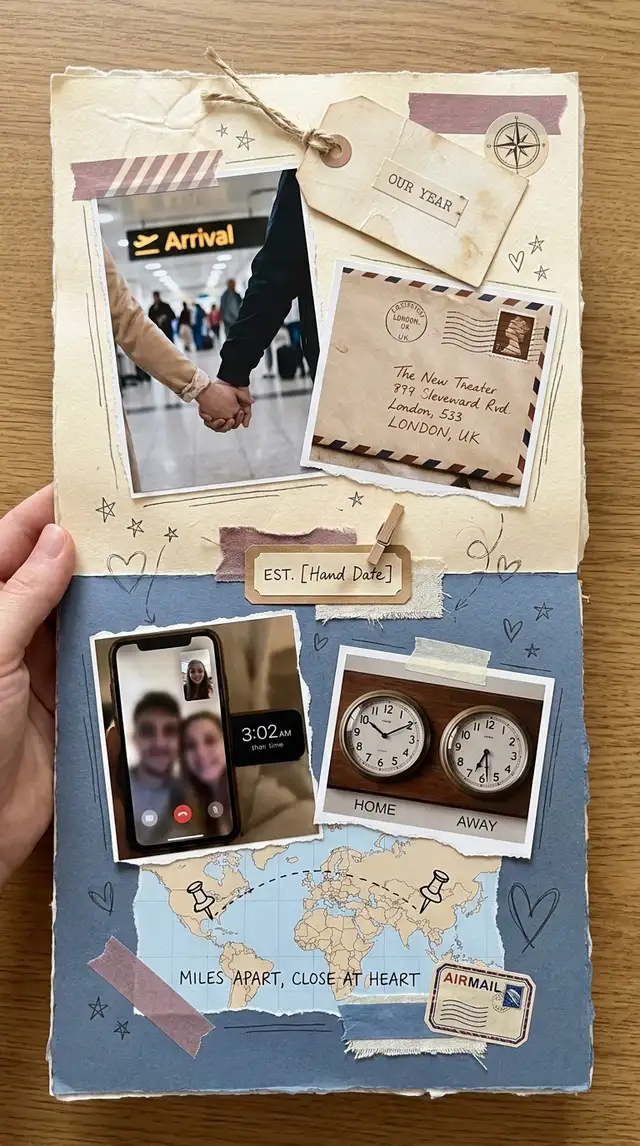
The evidence of this year is unglamorous: airport pickups, blurry FaceTime screenshots at 3am their time, a package mailed in handwriting that almost smudged off. Put it all on one canvas and it adds up to proof that the year actually counted.
Choose a ratio
Ingredients
- 8-12 photos that span the year — FaceTime screenshots, airport-pickup selfies, photos of packages received in their handwriting, photos from each in-person visit, one screenshot of a long message thread
- A photo from each visit (in-person frames are rare — protect them)
- A quiet split-tone Background — one cool side, one warm side, suggesting two cities
- Postal accents from the Sticker Library — stamps, a faintly drawn line connecting two pinned points, a small map
- A typewriter or handwritten font for one short line — the count of months, visits, or miles between cities
- Optional: a screenshot of a flight confirmation, a voice-note waveform, a photo of a letter mailed across the distance
How to make it
Make this in your browser Opens this recipe as a ready template — photo slots, decorations and the right canvas shape. No install, no account, and your photos never leave your device.-
Open Freestyle for chronological sprawl
Tap Freestyle. A Grid won't survive the photo set — FaceTime screenshots, airport selfies, and mailed packages all come from different cameras with different aspect ratios. The layout needs room to absorb the mismatch. Set the canvas to portrait — this collage is going to be sent directly to a phone, not framed.
-
Pull a mix that proves the year counted
Scroll your camera roll for the unglamorous evidence: FaceTime screenshots (the bad-lighting ones especially), airport-pickup selfies, photos of packages they mailed you, one screenshot of a long message thread you both reread. Then pull every photo from each in-person visit. The trip photos are rare — give them weight in the layout.
-
Run a unifying edit across mismatched sources
Tap each photo and open Photo Editing. The challenge here isn't aesthetics, it's coherence — a FaceTime screenshot, a phone selfie, and a print scan all look wildly different. Push warmth up slightly, drop saturation a touch, lift shadows on the screenshots so faces read clearly. A small amount of blur on the UI elements (the FaceTime banner, the time stamp) helps them feel less like screenshots and more like memories.
-
Set a split-tone background suggesting two cities
Swipe to Backgrounds. If the library has a gradient or two-tone option, pick one with warm cream on one side and cool dusk blue on the other, softly merging at the center. If not, set a solid cream and layer a cool blue rectangle from the Sticker Library at low opacity over half the canvas. Two zones, one canvas, the photos meeting in the middle.
-
Cluster the in-person visits, scatter the rest
Place each in-person visit's photos as a small cluster — three or four photos overlapping slightly. Between clusters, scatter the FaceTime screenshots, the airport selfies, the package photos. The clusters are the moments together; the scattered photos are the months in between. Let the eye travel from one cluster to the next like turning pages in a flight log.
-
Add postal motifs and one short line of text
Open the Sticker Library and search for postage stamps, a small map, or pinned-points icons. Place a stamp near a package photo, a small map near the cluster of one trip. Use the Doodle Tool to draw a faint thin line connecting the two cities — barely visible. Add one Custom Text line in a typewriter or handwritten font: the count of months ("Year One"), the count of miles ("4,827 miles, three visits"), or the date of the reunion you're counting toward.
-
Save and send before they wake up
Save at full resolution. Send directly to their phone the morning of the anniversary, in their time zone, before they wake up. For a printable version (for next time you're in the same room), export at 5x7 on matte paper and slip it into the next package you mail.
Try it differently
The Visit Recap
A single-trip collage built around every time you saw each other this year — photos clustered by trip, timestamped with the dates, sequenced chronologically. Use the Doodle Tool to draw a thin line connecting trip clusters across the canvas, like flight paths on a map. Adds up to a year-in-visits, which is what the year actually was.
The Closing-Distance Edition
Built around a future date — the move, the reunion, the visa, the lease that lines up. Add a "X days until" Custom Text overlay that ages well as a screenshot — the kind of thing you save and update as the number drops. The collage becomes a countdown you both look at, not just a record.
The Letters-and-Voicemails Edition
Layered with screenshots of long messages, voice-note waveforms (screenshot the waveform from your messaging app), and photos of handwritten letters mailed across the distance — proof of all the words in between the visits. Heavier on text and audio artifacts, lighter on photos.
Tips from the desk
- Don't upscale the FaceTime screenshots — the bad lighting is the actual texture of the year
- Two-tone backgrounds (warm cream + cool dusk blue, #B8A0A8 accent) carry the distance metaphor without saying "long distance"
- Cluster every visit; scatter every screenshot. The eye reads the difference instantly
- Send in their time zone, not yours — the anniversary lands when their morning does
- For a print, mail it. The package itself becomes part of the next year's collage
Frequently asked
-
What is a Long-Distance Anniversary Collage?
The evidence of this year is unglamorous: airport pickups, blurry FaceTime screenshots at 3am their time, a package mailed in handwriting that almost smudged off. Put it all on one canvas and it adds up to proof that the year actually counted.
-
What do I need to make a Long-Distance Anniversary Collage?
You will need: 8-12 photos that span the year — FaceTime screenshots, airport-pickup selfies, photos of packages received in their handwriting, photos from each in-person visit, one screenshot of a long message thread, A photo from each visit (in-person frames are rare — protect them), A quiet split-tone Background — one cool side, one warm side, suggesting two cities, Postal accents from the Sticker Library — stamps, a faintly drawn line connecting two pinned points, a small map, A typewriter or handwritten font for one short line — the count of months, visits, or miles between cities, Optional: a screenshot of a flight confirmation, a voice-note waveform, a photo of a letter mailed across the distance.
-
How many photos do I need for a Long-Distance Anniversary Collage?
Around 8-12 photos works best — enough to tell the story without crowding the layout.
-
What size or ratio is best for a Long-Distance Anniversary Collage?
A 9:16 vertical format works best — ideal for phone wallpapers and Instagram or TikTok Stories.
-
How long does it take to make a Long-Distance Anniversary Collage?
This collage takes about 20 min to make.
Free photo tools — no upload, no account
38 small tools that run in your browser. Your photos never leave your device.

Blur & Pixelate
Hide faces, plates, addresses — drag a patch over the spot.

Background Replace
Drop your subject onto paper, gradient, or your own backdrop photo.

Tilt-Shift Effect
Make real cities look like tabletop dioramas.

Polaroid Maker
Any photo, wrapped in paper with a handwritten caption.

Pinterest Pin Maker
Drop a photo, type a title, pick a layout. 1000×1500 native.

Crop & Resize
Square for IG, 9:16 for stories, 2:3 for Pinterest.
Learn the craft
- What Is a Collage? A Beginner's Guide to Every Style Photo collage, paper collage, digital, mixed media — a clear breakdown of every collage type, a short history, and a glossary to get you started.
- How to Make a Photo Collage in 8 Steps (2026) How to make a photo collage in 8 easy steps — from choosing your photos and layout to decorating and saving. A beginner's guide that works in any collage app.
- How to Choose a Collage Style Five distinct collage styles — from scrapbook warmth to minimalist calm. Find the one that fits your photos and your purpose.
- Best Photo Collage Apps in 2026: 7 Tested Free & Paid Picks We tested the best photo collage apps for iPhone & Android — PicCollage for creative freedom, Google Photos for quick free grids, Canva for polish. Compared inside.
You might also like
A few more cuts & pastes from the archive.

Baby's First Year Photo Collage
The hospital photo and the cake-smash photo are twelve months apart and look like two different children. Put them at opposite corners of o…

