Weekend Away with Friends Collage
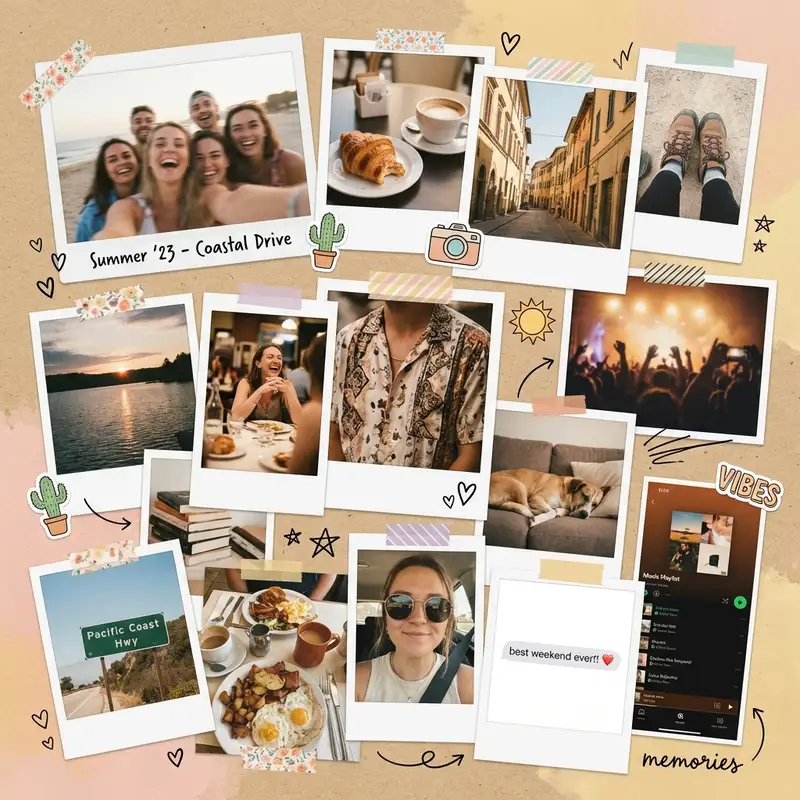
On the drive home somebody says you should do this every year, and everyone means it. Fifteen photos on one square page get that weekend into the group chat before anyone has unpacked.
Choose a ratio
Ingredients
- 8-15 photos from the same week, trip, or era — the more random, the better
- A mix of intentional shots and accidental ones (the blurry dance floor, the half-eaten meal, the sky you photographed for no reason)
- At least 2-3 candid photos of people caught mid-sentence or mid-laugh
- A warm, textured background from the Backgrounds library — kraft paper, linen, or warm cream
- Polaroid-style borders from the Sticker Library for 2-3 feature photos
- Optional: washi tape stickers, small doodles, a date stamp
- Optional: one screenshot — a text, a playlist, a Maps pin — to anchor the collage in a specific time and place
How to make it
Make this in your browser Opens this recipe as a ready template — photo slots, decorations and the right canvas shape. No install, no account, and your photos never leave your device.-
Open Freestyle and commit to the chaos
Tap Freestyle for a blank square canvas. This is not a grid collage — grids are for people who plan ahead. You are making something that looks like you emptied your camera roll onto a table and arranged it by feeling. Import 8-15 photos all at once. Do not overthink which ones. The whole aesthetic depends on including photos that are not individually perfect.
-
Scatter and stack with intentional messiness
Resize photos to different scales — some large, some tiny, some medium. Overlap edges so photos peek out from behind each other. Rotate a few by 2-3 degrees, never more. The tilt should feel like gravity, not a design choice. Let one or two photos get partially hidden behind others. The layering creates depth and makes the viewer lean in.
-
Add Polaroid borders to a few favorites
Open the Sticker Library and search for Polaroid or instant film frames. Drop them behind 2-3 of your best photos. Not every photo — just enough to break the visual rhythm. The white borders make those photos feel like keepsakes pulled from a shoebox.
-
Warm everything toward the same tone
Tap each photo and open Photo Editing. Nudge warmth up and pull saturation down slightly. Photos from different lighting conditions need to feel like they belong to the same weekend. A consistent warm cast — golden hour energy — ties together the fluorescent restaurant shot and the outdoor sunset.
-
Fill the gaps with texture
Swipe to Backgrounds and set the canvas to a warm, textured surface — kraft paper or linen. Then tuck small stickers into the empty spaces between photos: a strip of washi tape across a corner, a tiny heart, a hand-drawn star using the Doodle Tool. These details make the collage feel handmade rather than just cluttered.
-
Drop a date or caption and save
Tap Custom Text and add a small date range or a single word somewhere in the composition. "march" or "that weekend" or just the year. Keep the font casual — handwritten or rounded sans-serif. Save at full resolution in square format for Instagram, or switch to portrait for Stories.
Try it differently
Map-Anchored Version
Anchor the collage with a Maps screenshot or a photo of a street sign in the center. Surround it with food photos, architecture, candid moments, and one terrible selfie with a landmark. Add a small location name using Custom Text. This version tells a story about a place.
Minimal Version
Cut the photo count to 6-8 and give each photo more breathing room. Skip the stickers and Polaroid frames. Use a clean white background instead of texture. This version keeps the casual energy but strips back the visual noise — the same weekend, for people who own linen bedsheets.
Animated Version
Use Animation to make photos drop onto the canvas one at a time, building the pile. Export as a short video and post as a Reel or TikTok. The motion version is more fun to watch than the static one.
Tips from the desk
- Include at least one photo that makes you laugh and one that makes you feel something — that range is what makes it read like the weekend rather than a highlight reel
- Blurry and grainy photos are not mistakes here — they are texture
- Use Magic Cutout to lift a person out of a group photo and overlap them onto another image for a playful layered effect
- Square format works best for Instagram feed posts; switch to portrait for Stories or TikTok
- Anywhere from 8 to 15 photos works — fewer starts to feel curated, more stops being readable
Frequently asked
-
What is a Weekend Away with Friends Collage?
On the drive home somebody says you should do this every year, and everyone means it. Fifteen photos on one square page get that weekend into the group chat before anyone has unpacked.
-
What do I need to make a Weekend Away with Friends Collage?
You will need: 8-15 photos from the same week, trip, or era — the more random, the better, A mix of intentional shots and accidental ones (the blurry dance floor, the half-eaten meal, the sky you photographed for no reason), At least 2-3 candid photos of people caught mid-sentence or mid-laugh, A warm, textured background from the Backgrounds library — kraft paper, linen, or warm cream, Polaroid-style borders from the Sticker Library for 2-3 feature photos, Optional: washi tape stickers, small doodles, a date stamp, Optional: one screenshot — a text, a playlist, a Maps pin — to anchor the collage in a specific time and place.
-
How many photos do I need for a Weekend Away with Friends Collage?
Around 8-15 photos works best — enough to tell the story without crowding the layout.
-
What size or ratio is best for a Weekend Away with Friends Collage?
A 1:1 square format works best — perfect for Instagram posts and easy to print.
-
How long does it take to make a Weekend Away with Friends Collage?
This collage takes about 15 min to make.
Free photo tools — no upload, no account
38 small tools that run in your browser. Your photos never leave your device.

Tilt-Shift Effect
Make real cities look like tabletop dioramas.

Polaroid Maker
Any photo, wrapped in paper with a handwritten caption.

Pinterest Pin Maker
Drop a photo, type a title, pick a layout. 1000×1500 native.

Crop & Resize
Square for IG, 9:16 for stories, 2:3 for Pinterest.

QR Code Generator
Print-ready QR for menus, invites, journals, vCards.

Halftone Effect
Comic dots, risograph red, punk-zine textures.
Learn the craft
- What Is a Collage? A Beginner's Guide to Every Style Photo collage, paper collage, digital, mixed media — a clear breakdown of every collage type, a short history, and a glossary to get you started.
- How to Make a Photo Collage in 8 Steps (2026) How to make a photo collage in 8 easy steps — from choosing your photos and layout to decorating and saving. A beginner's guide that works in any collage app.
- How to Choose a Collage Style Five distinct collage styles — from scrapbook warmth to minimalist calm. Find the one that fits your photos and your purpose.
- Best Photo Collage Apps in 2026: 7 Tested Free & Paid Picks We tested the best photo collage apps for iPhone & Android — PicCollage for creative freedom, Google Photos for quick free grids, Canva for polish. Compared inside.
You might also like
A few more cuts & pastes from the archive.

Best Friend Photo Collage Gift
Scroll back far enough and the camera gets worse while the haircuts get braver. That photo, not the good one from last weekend, goes down o…

