Aesthetic Mood Board Collage
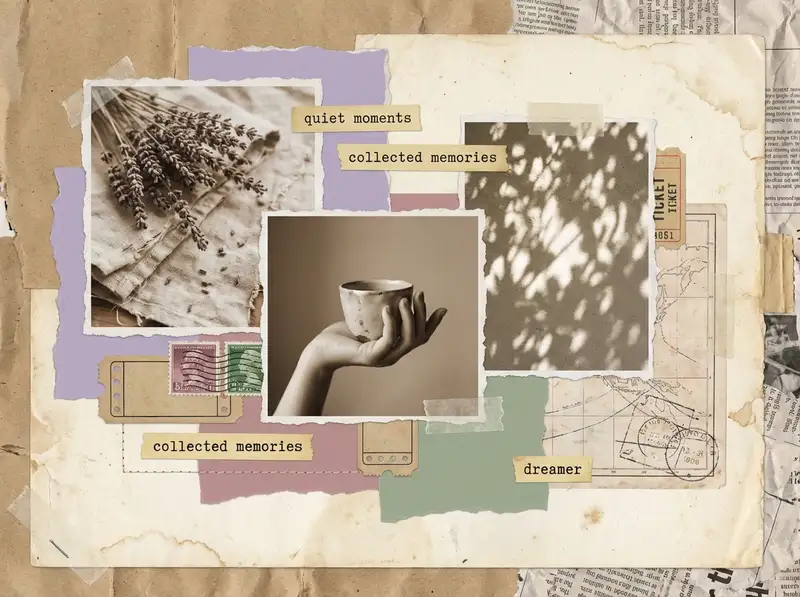
Ninety screenshots sit in your saved folder: a paint chip, someone else's kitchen, a linen dress you will never buy. A mood board is how you find out which four of them belong in the same room.
Choose a ratio
Ingredients
- 4-6 images that represent where you want to go, not just where you have been — saved screenshots, Pinterest finds, camera roll photos, color swatches, fabric textures
- 1-2 texture photos (fabric close-up, paint sample, tile pattern, wallpaper detail)
- 1-2 object or detail shots that anchor the direction (a lamp you love, a dress silhouette, a room corner, a floral arrangement)
- 1 color-dominant image that sets the palette for the whole vision
- A solid color from the Backgrounds library in your accent shade (soft lavender, dusty rose, sage, or cloud gray)
- Optional: a clean serif font from the text library for a single word or phrase — "nursery," "September," "new chapter"
- Optional: a torn-paper or film strip sticker from the Sticker Library
How to make it
Make this in your browser Opens this recipe as a ready template — photo slots, decorations and the right canvas shape. No install, no account, and your photos never leave your device.-
Pick a grid that fits your vibe
Open Grids and scroll to the 2x3 layouts on a landscape canvas — a mood board is a table you are arranging objects on, and landscape lets four or five images sit side by side instead of stacking into a column. Choose one with even spacing — you want breathing room between images. Tap the border slider and bump it up to medium thickness; round the corners just slightly.
-
Drop in your photos
Import 4-6 images from your camera roll that share a mood, not a subject. Tap each to crop — zoom in on textures, pull out on landscapes. If one image has a busy background, use Magic Cutout to isolate the subject and layer it over a color block.
-
Set a soft, muted background
Swipe to Backgrounds and pick a solid color pulled from your palette — dusty rose, sage, cloud gray. Avoid pure white; a warm cream feels more intentional. The background is what ties everything together.
-
Tune every photo toward the same world
Tap each image and open Photo Editing. Pull saturation down by 10-15% and nudge warmth up slightly. You want every photo to feel like it lives in the same room, even if they were taken months apart.
-
Add one quiet text element
Tap Custom Text and type a single word or short phrase. Choose a clean serif font, size it small, and center it in one of the grid cells or float it over a texture image. Lowercase. It's a whisper, not a headline.
-
Save at full resolution
Tap Save and choose the highest quality option. For Pinterest, export as a tall pin (1000x1500px). For Instagram stories, switch to 1080x1920. Skip the animation — mood boards work best as stillness.
Try it differently
Dark Academia Version
Swap the palette to deep brown, forest green, and aged cream. Fill the grid with old books, stone architecture, candlelight. Search the Sticker Library for vintage paper textures and layer one behind a cell. Add a Latin phrase in serif italic using Custom Text.
Coastal Calm Version
Blues, sand tones, and white. Ocean textures, driftwood, linen, morning light. Widen the grid borders for extra breathing room and set the background to warm sand. No text — let the palette speak.
Event Planning Mood Board
Use this format to plan a real thing — a wedding palette, a party theme, a nursery, a vacation wardrobe. Fill the grid with reference images: venue photos, color swatches, fabric textures, floral arrangements, furniture you are considering. Add a word or two per cell using Custom Text ("tablecloths," "ceremony arch," "guest bathroom"). Save it and share with your partner, planner, or group chat. This version is a working document disguised as a beautiful image.
Freestyle Collage Version
Skip the grid entirely. Open Freestyle and scatter your images on the canvas at slight angles. Use Magic Cutout to lift a subject from one photo and overlap it onto another. This version feels more handmade and less curated.
Tips from the desk
- Use Photo Editing to desaturate all images by 10-15% before placing them — instant cohesion
- One strong color repeated across three images is more powerful than six different tones
- Save as PNG for the sharpest quality when posting to Pinterest or sharing via message
- Mood boards work best when every image could plausibly exist in the same physical space
Frequently asked
-
What is a Aesthetic Mood Board Collage?
Ninety screenshots sit in your saved folder: a paint chip, someone else's kitchen, a linen dress you will never buy. A mood board is how you find out which four of them belong in the same room.
-
What do I need to make a Aesthetic Mood Board Collage?
You will need: 4-6 images that represent where you want to go, not just where you have been — saved screenshots, Pinterest finds, camera roll photos, color swatches, fabric textures, 1-2 texture photos (fabric close-up, paint sample, tile pattern, wallpaper detail), 1-2 object or detail shots that anchor the direction (a lamp you love, a dress silhouette, a room corner, a floral arrangement), 1 color-dominant image that sets the palette for the whole vision, A solid color from the Backgrounds library in your accent shade (soft lavender, dusty rose, sage, or cloud gray), Optional: a clean serif font from the text library for a single word or phrase — "nursery," "September," "new chapter", Optional: a torn-paper or film strip sticker from the Sticker Library.
-
How many photos do I need for a Aesthetic Mood Board Collage?
Around 4-6 photos works best — enough to tell the story without crowding the layout.
-
What size or ratio is best for a Aesthetic Mood Board Collage?
A 4:3 landscape format works best — great for prints, desktop wallpapers, and framed photos.
-
How long does it take to make a Aesthetic Mood Board Collage?
This collage takes about 10 min to make.
Free photo tools — no upload, no account
38 small tools that run in your browser. Your photos never leave your device.

Add Text to Photo
Handwritten captions, magazine headers, or a quick scribble.

HEIC to JPG / PNG
iPhone photos that open on everything.

Background Remover
Cut the background out of any photo in one click.

Duotone Effect
Map photo to two colors — Spotify, sunset, riso.

Adjust
Brightness, contrast, saturation, hue, blur — seven sliders.

Drop Shadow
Float a photo over paper for portfolios and mockups.
Learn the craft
- What Is a Collage? A Beginner's Guide to Every Style Photo collage, paper collage, digital, mixed media — a clear breakdown of every collage type, a short history, and a glossary to get you started.
- How to Make a Photo Collage in 8 Steps (2026) How to make a photo collage in 8 easy steps — from choosing your photos and layout to decorating and saving. A beginner's guide that works in any collage app.
- How to Choose a Collage Style Five distinct collage styles — from scrapbook warmth to minimalist calm. Find the one that fits your photos and your purpose.
- Best Photo Collage Apps in 2026: 7 Tested Free & Paid Picks We tested the best photo collage apps for iPhone & Android — PicCollage for creative freedom, Google Photos for quick free grids, Canva for polish. Compared inside.
You might also like
A few more cuts & pastes from the archive.

Best Friend Photo Collage Gift
Scroll back far enough and the camera gets worse while the haircuts get braver. That photo, not the good one from last weekend, goes down o…

