Birthday Collage for Mom
The drugstore card sits unread by Tuesday. A birthday collage for Mom doesn't — it proves you went looking, through years of camera rolls, past the blurry ones.
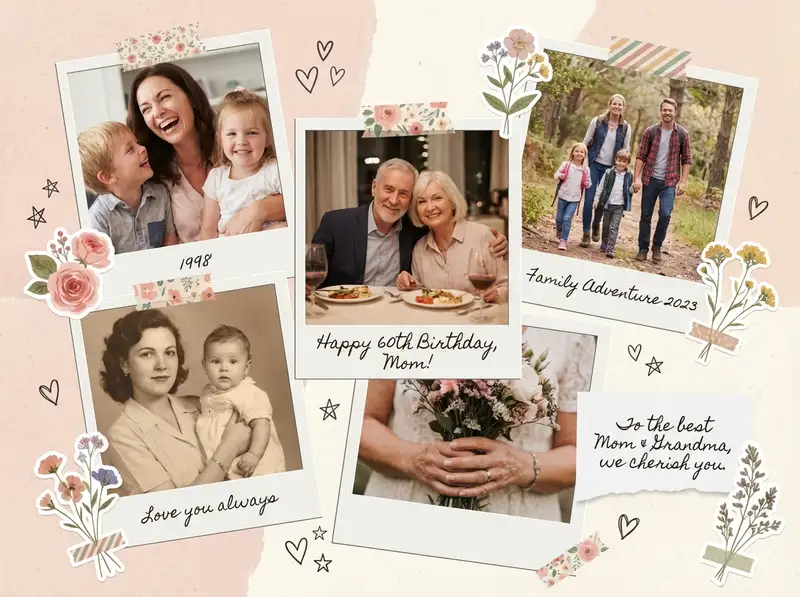
Choose a ratio
Ingredients
- 3-6 family photos from your camera roll (mix of candid and posed, at least one from childhood and one recent)
- Floral stickers from the Sticker Library — roses, wildflowers, botanical frames
- A handwritten-style or elegant serif font for the birthday message
- Warm background color — blush pink, soft cream, or light kraft tone
- Optional: washi tape stickers, small heart accents, a photo of her handwriting or a card she once wrote you
How to make it
Make this in your browser Opens this recipe as a ready template — photo slots, decorations and the right canvas shape. No install, no account, and your photos never leave your device.-
Start with a birthday template
Open Templates and browse the birthday category. Look for something with floral accents and a warm color palette — blush, cream, gold. A template gives you a beautiful starting point, and you can swap every element to make it yours.
-
Swap in your family photos
Tap each placeholder and replace it with photos from your camera roll. Mix close-ups with wider shots: Mom laughing at dinner, a childhood photo of the two of you, a candid from last holiday. Crop each photo to focus on the emotion — zoom in on faces, let the background fall away.
-
Warm up the palette
Tap each photo and open Photo Editing. Push warmth up slightly and add a soft, gentle filter — something that pulls everything toward peach and golden tones. If the template background feels too cool, swap it for a warm cream or dusty rose from the Backgrounds library.
-
Add floral touches
Open the Sticker Library and search for floral frames, botanical corners, or watercolor flowers. Tuck them around the edges of photos or in the corners of the canvas. Layer a delicate bloom behind one photo so it peeks out. Restraint matters — two or three floral elements say "elegant," ten say "craft store."
-
Write your birthday message
Tap Custom Text and type something genuine: "Happy Birthday, Mom" or a line that means something to your family. Choose a handwritten-style font and size it so it feels like a note you'd tuck inside a card. Use the Doodle Tool to draw a small heart or underline a word — the imperfection is what makes it feel personal.
-
Save and share
Save at full resolution. For a printed gift, export at the highest quality and order a print on matte photo paper. To share digitally, send it straight to the family group chat or post to Instagram Stories on the morning of her birthday.
Try it differently
Minimalist Version
Skip the template. Open a Grid with 2x3 cells, drop in five photos and one solid blush color block, and add just her name in small serif text. The simplicity lets the photos carry all the feeling.
Video Surprise
Use Animation to reveal each photo one at a time, ending with the birthday message. Export as a looping video and text it to her first thing in the morning. This is the version that gets the "you made me cry" reply.
Multi-Generation Version
Build the whole arc of her — the grainy photo of her at twenty before she was anyone's mom, her holding you in a hospital blanket, her at your graduation, her holding a grandchild now. Lay them left to right across a Freestyle canvas in true chronological order, with the year below each in small, consistent type. The leap from the faded film grain of the first photo to the sharp phone shot of the last is the whole story: this is a life, and you were the middle of it.
Tips from the desk
- Odd numbers of photos (5, 7) create more dynamic compositions than even numbers
- Warm, desaturated tones feel more emotional than bright saturated colors — use Photo Editing to pull saturation down slightly
- Leave at least 20% of the background visible so the collage can breathe
- Save as PNG for printing; the floral sticker details stay crisp at any size
Frequently asked
-
What is a Birthday Collage for Mom?
The drugstore card sits unread by Tuesday. A birthday collage for Mom doesn't — it proves you went looking, through years of camera rolls, past the blurry ones.
-
What do I need to make a Birthday Collage for Mom?
You will need: 3-6 family photos from your camera roll (mix of candid and posed, at least one from childhood and one recent), Floral stickers from the Sticker Library — roses, wildflowers, botanical frames, A handwritten-style or elegant serif font for the birthday message, Warm background color — blush pink, soft cream, or light kraft tone, Optional: washi tape stickers, small heart accents, a photo of her handwriting or a card she once wrote you.
-
How many photos do I need for a Birthday Collage for Mom?
Around 3-6 photos works best — enough to tell the story without crowding the layout.
-
What size or ratio is best for a Birthday Collage for Mom?
A 4:3 landscape format works best — great for prints, desktop wallpapers, and framed photos.
-
How long does it take to make a Birthday Collage for Mom?
This collage takes about 15 min to make.
Free photo tools — no upload, no account
38 small tools that run in your browser. Your photos never leave your device.

Photo Filters
Eight looks plus the original — vintage to cinematic.

RGB Glitch
VHS bands, anaglyph 3D, CRT scanlines, chromatic aberration.

Diptych Maker
Two photos, side-by-side or stacked.

Add Text to Photo
Handwritten captions, magazine headers, or a quick scribble.

HEIC to JPG / PNG
iPhone photos that open on everything.

Background Remover
Cut the background out of any photo in one click.
Learn the craft
- How to Make a Mothering Sunday Photo Collage for Mum Make a Mothering Sunday photo collage for Mum from four shared memories, with UK timing, actual editor screenshots, a personal caption and a downloadable JPG.
- What Is a Collage? A Beginner's Guide to Every Style Photo collage, paper collage, digital, mixed media — a clear breakdown of every collage type, a short history, and a glossary to get you started.
- How to Make a Photo Collage in 8 Steps (2026) How to make a photo collage in 8 easy steps — from choosing your photos and layout to decorating and saving. A beginner's guide that works in any collage app.
- How to Choose a Collage Style Five distinct collage styles — from scrapbook warmth to minimalist calm. Find the one that fits your photos and your purpose.
You might also like
A few more cuts & pastes from the archive.

Sibling Birthday Collage (For a Brother or Sister)
Nobody else has these photos. You were in the matching Halloween costumes and you survived the bowl-cut years, which makes you the only per…

