Pet Photo Collage
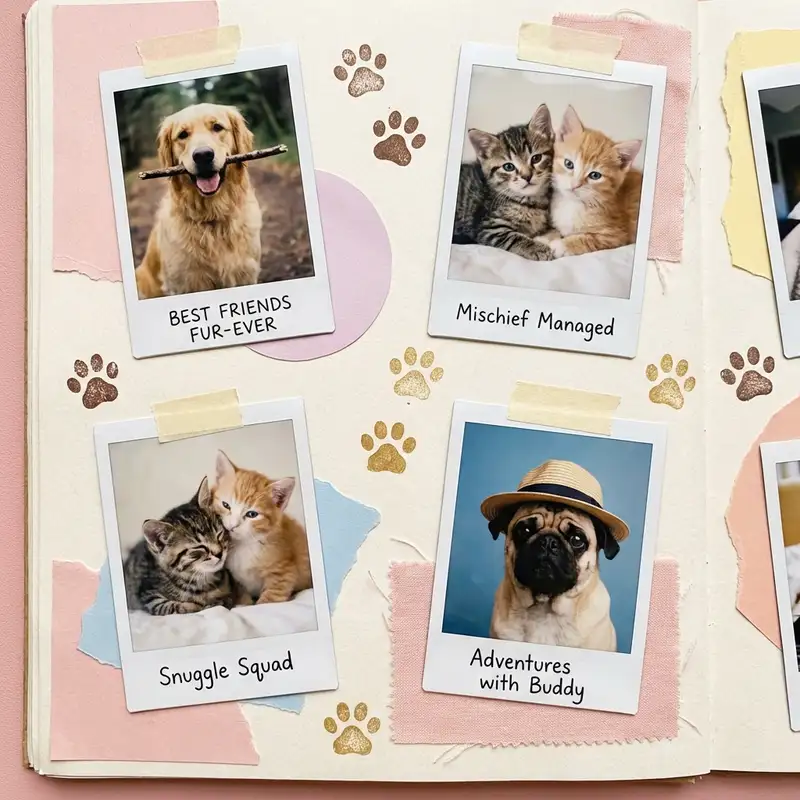
You have four hundred photos of an animal who cannot say their own name. They'll never know you made this — but you will, and that is the entire point.
Choose a ratio
Ingredients
- 6-12 photos of your pet (sleeping, zooming, mid-yawn, looking noble, looking absurd)
- Stickers from the Sticker Library — paw prints, hearts, bones, stars, washi tape in soft colors
- A warm pastel background — soft butter yellow, pale mint, blush pink, or lavender
- A rounded or handwritten font for captions and your pet's name
- Optional: a photo of their favorite toy, their adoption day paperwork, a screenshot of a vet text that made you cry
How to make it
Make this in your browser Opens this recipe as a ready template — photo slots, decorations and the right canvas shape. No install, no account, and your photos never leave your device.-
Pick a grid or go freestyle
If your pet has a clear "best photo," open Freestyle so you can make it big and build around it. If every photo is equally important (because of course it is), open Grids and choose a 3x3 or 2x3 layout with rounded corners and generous borders. Either way works — this collage is forgiving because the subject matter does all the heavy lifting.
-
Curate the highlight reel
Scroll through your camera roll and pick 6-12 photos that capture the full personality. You want range: the noble ones, the undignified ones, and at least one blurry action shot that proves they have a chaotic side. If two photos look too similar, keep the funnier one.
-
Place photos and let the best one lead
Drop your favorite photo in the largest spot or the center of the canvas. Arrange the rest around it. In Freestyle, overlap edges slightly and tilt a few photos for a scattered-prints look. In Grids, let the layout handle spacing and focus on cropping each photo so faces and paws are centered. Use Photo Editing to bump warmth up a touch on any photo that looks cold or clinical.
-
Set a soft, happy background
Swipe to Backgrounds and pick a warm pastel. Butter yellow feels sunny and cheerful, pale mint feels fresh, blush pink feels cozy. Match the vibe to your pet — a golden retriever practically demands a warm yellow; a black cat looks sharp against lavender. Avoid pure white — a slight tint makes every fur color pop.
-
Decorate with stickers and doodles
Open the Sticker Library and search for paw prints, bones, hearts, and stars. Scatter paw prints along edges or in corners like your pet walked across the collage. Tuck a heart near their face in your favorite photo. Use the Doodle Tool to draw tiny arrows pointing to the best moments or to sketch a small crown on their head. Keep it light and playful — this is a celebration, not a design competition.
-
Add their name and a caption
Tap Custom Text and type your pet's name in a rounded, friendly font. Place it somewhere prominent. Add a small subtitle if you want — their breed, their age, or an honest caption like "professional napper" or "chaos coordinator." Size the name larger than anything else on the collage. They deserve top billing.
-
Save and share
Save at full resolution. Post to Instagram, send to the family group chat, or print on matte photo paper and stick it on the fridge. For an animated version, use Animation to make photos pop in one at a time — export as a video for stories or reels. Your pet does not care about any of this, but every pet parent who sees it will.
Try it differently
Adoption Day Keepsake
Include their shelter photo alongside recent photos to show the glow-up. Add the adoption date as text and use Magic Cutout to lift your pet from the shelter photo and place them next to their current self. Frame it. You will cry. That is fine.
Pet Memorial Version
Choose the most peaceful, warm-toned photos. Pull saturation down slightly in Photo Editing for a gentle, muted palette. Use a soft cream background. Add their name, years, and a single line of text. Keep decorations minimal — a few small hearts, nothing more. Simplicity honors them best.
Multi-Pet Chaos Board
Give each animal their own color zone — the senior dog gets warm gold, the kitten gets mint, the one who rules the house gets the biggest square in the middle. Let the photos bleed across the borders so the dog's tail ends up in the cat's section, because that's exactly how the house runs. Doodle each name above its zone in a different scrawl. The board comes out loud and overlapping and a little unfair to the quiet one, just like living with all of them.
Tips from the desk
- Use Magic Cutout on your pet's best portrait to create a sticker you can place anywhere — on a colorful background, over other photos, or floating with a crown sticker above their head
- Blurry action shots of pets running or jumping belong in every pet collage — the blur IS the personality
- Soft pastels (#F5E6B8 butter yellow, #E8D5E0 blush) let fur textures and eye colors stay the star of the show
- If you are printing, save as PNG for crisp sticker edges and text
Frequently asked
-
What is a Pet Photo Collage?
You have four hundred photos of an animal who cannot say their own name. They'll never know you made this — but you will, and that is the entire point.
-
What do I need to make a Pet Photo Collage?
You will need: 6-12 photos of your pet (sleeping, zooming, mid-yawn, looking noble, looking absurd), Stickers from the Sticker Library — paw prints, hearts, bones, stars, washi tape in soft colors, A warm pastel background — soft butter yellow, pale mint, blush pink, or lavender, A rounded or handwritten font for captions and your pet's name, Optional: a photo of their favorite toy, their adoption day paperwork, a screenshot of a vet text that made you cry.
-
How many photos do I need for a Pet Photo Collage?
Around 6-12 photos works best — enough to tell the story without crowding the layout.
-
What size or ratio is best for a Pet Photo Collage?
A 1:1 square format works best — perfect for Instagram posts and easy to print.
-
How long does it take to make a Pet Photo Collage?
This collage takes about 10 min to make.
Free photo tools — no upload, no account
38 small tools that run in your browser. Your photos never leave your device.

Crop & Resize
Square for IG, 9:16 for stories, 2:3 for Pinterest.

QR Code Generator
Print-ready QR for menus, invites, journals, vCards.

Halftone Effect
Comic dots, risograph red, punk-zine textures.

Photo Negative
Film negative to photo, plus cyanotype, blueprint, X-ray, darkroom, sepia.

Shape Crop
Circle, heart, star, arch — pick a cookie cutter.

Vintage Date Stamp
LED red, Kodak yellow, camcorder amber.
Learn the craft
- What Is a Collage? A Beginner's Guide to Every Style Photo collage, paper collage, digital, mixed media — a clear breakdown of every collage type, a short history, and a glossary to get you started.
- How to Make a Photo Collage in 8 Steps (2026) How to make a photo collage in 8 easy steps — from choosing your photos and layout to decorating and saving. A beginner's guide that works in any collage app.
- How to Choose a Collage Style Five distinct collage styles — from scrapbook warmth to minimalist calm. Find the one that fits your photos and your purpose.
- Best Photo Collage Apps in 2026: 7 Tested Free & Paid Picks We tested the best photo collage apps for iPhone & Android — PicCollage for creative freedom, Google Photos for quick free grids, Canva for polish. Compared inside.
You might also like
A few more cuts & pastes from the archive.

Pet Memorial Tribute Collage
A way to keep them in the room — every silly photo, every chewed shoe, every nap on your chest, arranged into something you can actually lo…

